
Managing the Address Tab
Before You Start
The Address tab controls how the recipient details appear in the header of your Quote, Job and Invoice.
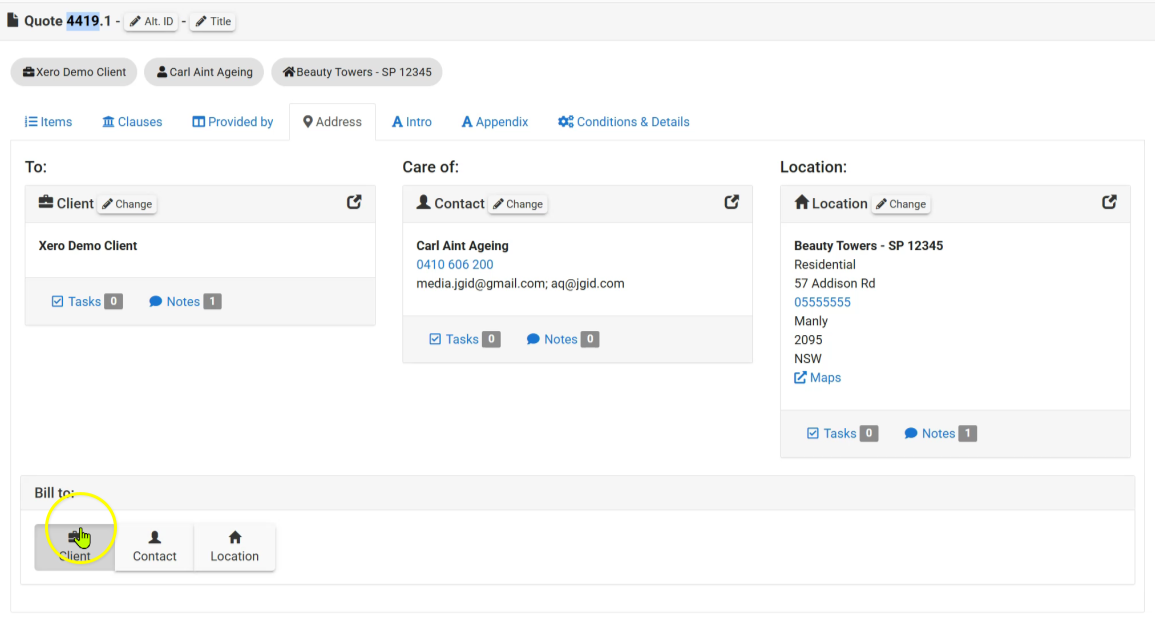
The document header is divided into three sections:
- To
- Care Of
- Location
These are by default:
- To: Client
- Care Of: Contact
- Location: Location
If you change the Bill To selection to Location, the document header will automatically be rearranged as:
To: Location
Care Of: Client / Contact
Location: Location
How to Manage the Address Tab
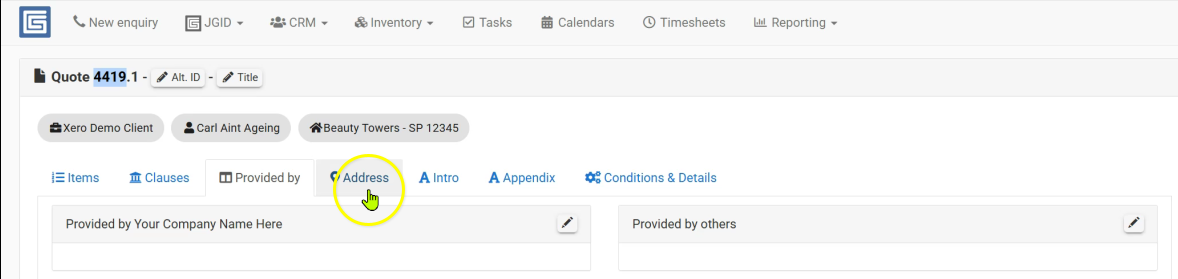
Step 1 - Navigate to the Address tab
- Open your Quote
- select the Address tab.
Step 2 - Filling In the Information
- Review the selected Client, Contact and Location details.
- Choose who the document should be billed to using the Bill To option.
JGID will automatically rearrange the document header based on your selection.
Best Practice
- The Bill To option controls how the recipient information is presented on your Quote, Job and Invoice without changing your Customer, Contact or Location records.
- You can change the Bill To selection at any stage, but it is most commonly updated when preparing an Invoice.
- For example, the work may have been quoted to a building manager, but the Invoice needs to be addressed to a Body Corporate, Owners Corporation, Strata Plan or another entity responsible for payment.
- Always use the preview Quote button before sending/downloading the document to ensure the recipient details are correct.
Summary
- Open your Quote
- select the Address tab.
- Review the selected details.
- Choose who the document should be billed to using the Bill To option.
JGID will automatically rearrange the document header based on your selection.
Related Articles
- How to Create a Quote
- Understanding Customers
- Understanding Contacts
- Understanding Locations
- Managing the Conditions & Details Tab