
Understanding Quote Templates
Before You Start
Quote Templates allow you to create professional, consistent Quotes while significantly reducing preparation time.
Rather than starting from scratch each time, you can build a library of reusable templates containing your standard Items, Introduction, Appendix, Checklist and other Quote content.
Well-designed Quote Templates help maintain a consistent appearance across all of your customer documents.
Managing Quote Templates
To manage your Quote Templates:
- Navigate to Inventory.
- Select Quote Templates.
- Choose the Template you wish to edit.
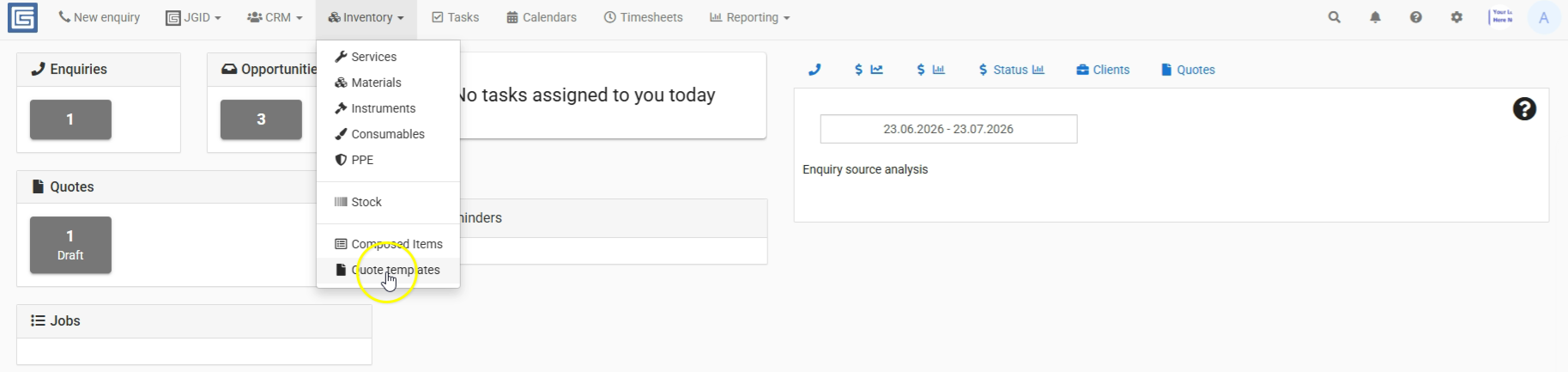
If no Templates are listed, you'll first need to create one by saving a Draft Quote as a Template.
Once you've selected a Template, you can edit it just like a normal Quote.
The main difference is that a Quote Template isn't linked to a specific Client, Contact or Location. Instead, it acts as a reusable starting point for future Quotes.
What's Typically Included?
Most businesses use Quote Templates to standardise the sections that rarely change.
These commonly include:
- Standard Quote Items.
- The Introduction.
- The Appendix.
- Clauses.
- Checklist items.
The Appendix is often used as a marketing tool to promote additional products or services and may only need updating occasionally.
The Introduction often remains similar between Quotes, although project-specific photos, drawings or notes can easily be added after the Template has been imported.
Template Functions
When working with a Quote Template, you can:
- Edit the Template.
- Create a New Version.
- Preview the Template.
- Download the Template.
- Delete the Template.
Best Practice
- Build separate Templates for the different services your business provides.
- Keep your Appendix up to date with your latest products and services.
- Add project-specific information to the Introduction after importing the Template into a new Quote.
- Review your Templates periodically to ensure they reflect your current business practices.
Related Articles
- Saving a Quote as a Template
- Quote Creation Best Practices
- Understanding the Master Matrix
- Understanding Checklist Automation